Oracle Enterprise Manager Administrator's Guide Go to Product Documentation Library
Library
Go to books for this product
Product
Go to Contents for this book
Contents
Go to Index
Index


Go to previous file in sequence Go to next file in sequence

Agents and Communication Daemon


The Oracle Enterprise Manager Console works with Intelligent Agents and a Communication Daemon to gather information about the network environment, communicate with network objects, and manage jobs and events. Topics discussed in this chapter include:

Agents

The agents are intelligent processes running on remote nodes in the network. An agent resides on the same node as the service it supports. However, the agent can support more than one service on a particular node. For example, if two databases are installed on one machine, a single agent can support both databases. The agents are responsible for:

Using Tcl scripts submitted as jobs or events, you can program an agent to perform a task or to detect problems. By submitting a fixit job along with an event registration, you can also program an agent to correct a problem when it is detected.

Characteristics

Agents are autonomous because they can function without requiring that the console or daemon be running. An agent that services a database can run without the database being up, allowing the agent to start up or shut down the database.

The Intelligent Agents can independently perform administrative tasks or jobs at any time, without active participation by the administrator. Similarly, the agents can autonomously detect and react to events, allowing them to monitor the system and execute a fixit job to correct problems without the intervention of the administrator.

The agents operate independently of the Console, allowing them to execute jobs and monitor events even when the administrator has logged out of the Console. The agents queue any job or event messages destined for that administrator, and deliver them when the administrator logs in to a Console again. Information about jobs and events are stored in flat files on the agent's node. These files have a ".q" extension and are stored in the $ORACLE_HOME\network\agent directory (Windows platform).

Note:
The agent queues a maximum of 500 messages. After the limit is reached, the oldest messages are dropped.

Network Encryption

Network encryption can be accomplished with the Secure Network Services option of SQL*Net. The Secure Network Services (SNS) option uses a sophisticated algorithm to provide strong encryption on the Transparent Network Substrate (TNS) connections. When the agent supports direct TCP/IP connections, as an option instead of TNS, SNS features will still be accessible. For information on SNS, see the Secure Network Services Administrator's Guide.

SNMP Support

The agents support SNMP, so applications can communicate directly with the agent using SNMP protocol. The agents provide access to Oracle's database Management Information Base (MIB) variables.

Although the agent supports SNMP, the communication daemon does not use that protocol to communicate with the agent. You can submit jobs or events that access Oracle MIB variables even when the database resides on a platform that does not support SNMP.

Event and Job Support

The agents are responsible for executing jobs and monitoring for events. Jobs and events are implemented as Tcl scripts. When the agent executes a job or tests for an event, it runs the appropriate Tcl script. Because jobs can be long-running or complicated tasks, such as a database backup job, the agent does not execute the job in its process space. Jobs are run in a separate process. When the job is completed, the agent sends the results to the communication daemon. In contrast, event scripts are typically run directly by the agent. Event scripts are used for detecting exceptions and are expected to have short execution times.

When the daemon sends a message to an agent on behalf of an administrator logged into the Console, the daemon sends the agent information about the administrator's language and character set environment. The agent uses the NLS environment information when it performs database administration tasks on behalf of the administrator. This allows administrators to manage databases in their native languages. For example, an administrator in France can administer a database in Germany and receive messages in French.

Installing the Agent

An agent must be installed on the same node as the database that the agent services. For information on installing and configuring the agent, see the Oracle Enterprise Manager Installation Guide or the Oracle server platform-specific installation documentation for your system.

For more information on SNMP, see the Oracle Network Manager Administrator's Guide, Oracle SNMP Support Reference Guide, and Oracle Network Products Messages Manual.

Communication Daemon

The Communication Daemon is a process that runs with the Console on the client machine. There is one Communication Daemon for each Console. The Communication Daemon is responsible for:

The Communication Daemon is implemented as a multi-threaded process. For example, separate threads in the daemon perform activities such as submitting jobs and events to agents, discovering new services in the network, or receiving messages from agents. Because the daemon's threads operate independently, the daemon can perform various operations simultaneously and perform efficiently in large busy distributed environments.

Communication between the daemon and the agents is vital to the Job and Event systems. The daemon must be able to send messages to the agents in order to submit jobs and events. The agents must be able to send messages to the daemon to report results and status messages for the jobs and events.

Note:
Job scheduling and event management rely on communication between the Console, agent, and daemon, and require SQL* Net V2.3, which is included with Oracle Enterprise Manager.

The daemon and agents communicate using Oracle Remote Operations, which is a remote procedure call mechanism based on the Transparent Network Substrate (TNS). The daemon and agents can also use Oracle Secure Network Services (SNS) to maintain the security of their network transmissions. The daemon can communicate with any agent in the system, regardless of the different protocols used in the distributed environment.

Message Queues

The daemon and agents use message queues for the messages they send. Using queues ensures that no messages are lost even when the communication daemon or agent is down. The daemon maintains several queues for messages. The operations queue contains job and event requests sent by the Console. For example, when you submit a new job to the Job system, the Console queues the new job request on the daemon's operations queue.

Failed Queue

When the daemon retrieves a job or event request from its operation queue, it tries to contact the agent that should receive the request. If it cannot contact the agent, the daemon places the request in its failed queue. Periodically the daemon tries to contact the agent which is responsible for the operation request in the failed queue. If the daemon successfully contacts the agent, the operation request is removed from the failed queue and sent to the responsible agent.

Notification Queue

The daemon maintains a notification queue for job and event notification. The notification queue contains messages about the status of jobs and events. When the daemon receives a message from an agent regarding a job or event, it places the message in the notification queue. When the daemon changes the status of a job or event it also places a message in the queue.

For example, when the daemon has successfully submitted a new job to an agent, it places a message in the notification queue updating the job's status to submitted. Messages in the notification queue are used to update the job and event information stored in the repository.
Connection Cache

In order for a daemon and an agent to pass messages, they must establish a connection. Rather than requiring that the daemon or agent create a new connection each time it wants to send a message, the daemon maintains a cache of connections. If a connection is needed and it already exists in the cache, it can be reused. This reduces the overhead involved in creating new connections. Connections in the cache are aged out using a least recently used algorithm.

Daemon Manager

The Oracle Daemon Manager allows you to manage communicaton between the Console's Communication Daemon and agents. The monitor provides a menu for performing administration tasks and a tree structure for viewing:

Note:
If you launch the Daemon Manager when Oracle Enterprise Manager is not running, you can only configure the parameter settings.

Agent Pending Operations

The Agent Pending Operations folder lists the nodes that have pending job or event operations that have not been delivered to the agent. The nodes are listed in the following folders:

When viewing this folder, a multi-column list displays on the right side of the screen. The list identifies the node name, the last contact, the last connect attempted, and the number of job and event operations for each node.

Application Pending Notifications

The Application Pending Notifications folder lists the third-party applications and users that have pending job or event notifications that have not been delivered to the agent. The applications and users are listed in the following folders:

When viewing this folder, a multi-column list displays on the right side of the screen. The list identifies the username, application, and number of job and event notifications for each application.

Monitored Nodes

The Monitored Nodes folder lists the nodes that are being monitored for the UpDown event. When viewing this folder, a multi-column list displays on the right side of the screen. The list identifies the node name, the last contact, and the last connect attempted for each node. If you select a specific node in the tree, additional information identifies the application and user for that node.

Daemon Configuration Parameters

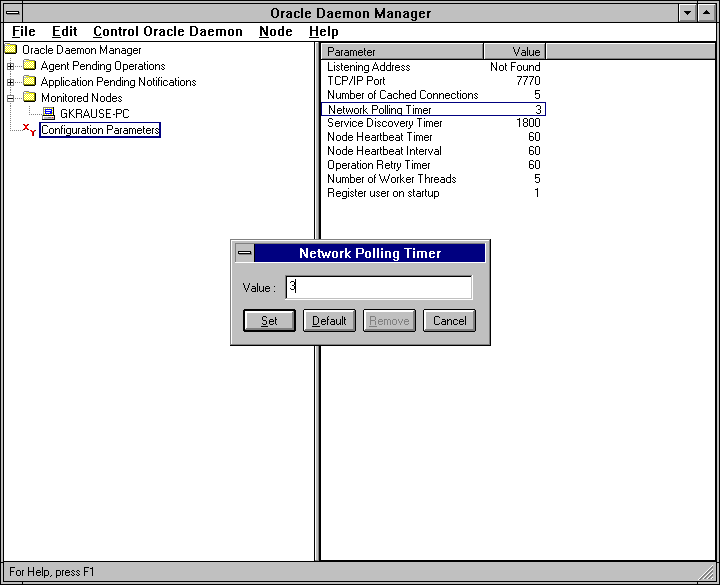
The communication daemon parameters and settings are viewed and updated with Oracle Daemon Manager. The defaults are usually sufficient to run OEMGR. See Figure 6-1: Parameter Settings for the Communication Daemon for an illustration of the daemon parameters.

Figure 6-1: Parameter Settings for the Communication Daemon
The parameters for the communication daemon include:

Listening Address
The address of the listener. If this address is set, the daemon uses this address and the TCP/IP Port setting is ignored. This parameter should only be set if you want to use a protocol other than TCP/IP, such as the SPX protocol.

Note:
When entering an address, make sure you are using a valid TNS address. For more information, see the Oracle Network Manager Administrator's Guide.

TCP/IP Port
The TCP/IP port that the daemon listens on. If the Listening Address parameter is not set, the daemon listens using TCP/IP with this port setting. The default is 7770. If an error message displays regarding "failed to listen for incoming requests", you may to need change the default value.

Number of Cached Connections
The number of open connections to agents. Default is 5 connections.

Networking Polling Timer
The frequency that the daemon checks for incoming data from an agent. Default is 3 seconds.

Service Discovery Timer
Frequency that the daemon queries for additional services that have been added to the network. Default is 1800 seconds.

Node Heartbeat Timer
Frequency that the daemon checks to see if a node is up. This applies to nodes registered with the UpDown event. Default is 60 seconds.

Node Heartbeat Interval
Frequency that the daemon checks if a node is up after the node has been determined to be up and working. This can be set to a different value than the Node Heartbeat Timer so that a working node is checked at a less frequent interval. Default is 60 seconds.

Operation Retry Timer
Frequency that the daemon retries any failed operation. Default is 60 seconds.

Number of Worker Threads
The number of threads available. This setting should match the size of the connection cache. Default is 5.

Register User at Startup
Determines whether the user is registered at the computer where OEMGR is started. If set to 1, the user is registered at the machine where OEMGR is started. If set to 0, the registration is ignored. Default is 1.

View and Updating Parameters

To view and update the parameters and settings:

1.
Select Configuration Parameters in the Daemon Manager tree on the left side of the screen to view the parameters and settings. The parameters are displayed on the right side of the screen. Usually, the default settings are sufficient.
2.
Double-click on a parameter listed on the right side of the screen to display a dialog box that allows you to update the parameter setting.
3.
Enter a new setting value in the dialog box. You can also:
a.
Click on the Default button to enter the default value.
b.
If a Listening Address has been entered, click on the Remove button to remove the address.
4.
Click on the Set button to save the value or click on the Cancel button to exit the dialog box without changing the parameter setting.
Note:
A new parameter setting is used the next time Oracle Enterprise Manager is executed.

Attention:
You need to have permission to update the NT registry in order to change the parameters.

Daemon Manager Menu

The menu options of the Oracle Daemon Manager are:

File

The File menu provides the following option:

Exit
Exits the Daemon Manager.

Edit

The Edit menu provides the following option:

Delete
Deletes the selected operation from the tree and the daemon queue. Also notifies the Console of the change.

When problems persist with a job or event operation, the Console and agent may be out of sync. This can happen due to data corruption or the accidental deletion of files. The Delete option allows you to remove the operation from the repository.

You may also need to delete the operation in the files that the agent maintains on the node where the agent is running. Those files are stored in the $ORACLE_HOME\network\agent directory (Windows platform) and have a ".q" extension. The agent must be shut down and all the ".q" files must be deleted. This removes all the jobs and events from that node.

Control Oracle Daemon

The Control Oracle Daemon menu provides the following options:

Force Service Discovery
Forces the daemon to check for the current network objects.

Force Operation Retry
Forces the retry of operations for all nodes. This is useful if the Console machine has been disconnected or if you are dialing into the network at intervals.

Force Node Heartbeating
Forces the daemon to monitor (heartbeat) the nodes to see if they are up.

Node

The Node menu provides the following option:

Ping
Pings the monitored node to check whether the agent on the node is running.

Help

The Help menu provides the following options:

Contents
Displays the overview topic of help.

About...
Displays version information about the program.


Go to previous file in sequence Go to next file in sequence
Prev Next
Oracle
Copyright © 1996 Oracle Corporation.
All Rights Reserved.
Go to Product Documentation Library
Library
Go to books for this product
Product
Go to Contents for this book
Contents
Go to Index
Index